
What Is a Mobile Computer Workstation? (And How It Differs From a Standard Cart or Desk Setup)
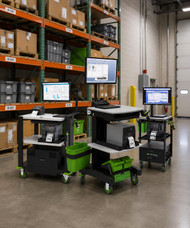
As more organizations rely on digital tools to manage inventory, patient records, production data, and other day-to-day operations, employees need technology that can move with the work instead of keeping them tied to a fixed desk or shared computer terminal.
That's where mobile computer workstations come in. Designed to combine computing power with mobility, these systems allow teams to access applications, enter data, and complete tasks wherever work is happening. But while they may look similar to utility carts or rolling desks at first glance, they are built for a very different purpose.
In this guide, we'll explain what a mobile computer workstation is, how it differs from standard carts and traditional desk setups, and why many organizations use them to improve workflow efficiency and productivity.
What Is a Mobile Computer Workstation?
A mobile computer workstation is a fully integrated, wheeled setup designed to support computing tasks directly at the point of work. It typically includes secure mounting for a monitor, CPU or laptop, keyboard tray, and power system, all built into a stable frame that can be moved through active work environments.
These units are built for operational efficiency. Instead of relying on a fixed desk or shared terminal, teams can bring the workstation to the task. That might mean documenting patient information bedside, scanning inventory in an aisle, or accessing live data on a factory floor.
The design focuses on three core priorities: mobility, durability, and workflow continuity. Each component is selected to withstand constant movement, frequent handling, and demanding environments while keeping devices protected and ready for use.
Mobile computer workstations also help standardize how digital tools are used across teams. By creating a consistent, mobile point-of-use system, they reduce downtime, minimize back-and-forth travel, and keep critical information tied directly to where work is happening.
How It Differs From a Standard Cart
A standard utility cart is designed primarily for transport. It moves items from one place to another but is not built to support active computing or continuous digital workflows. A mobile computer workstation, by contrast, is engineered as a functional work platform, not just a carrier.
1. Purpose-Built vs General Use
Standard carts are multipurpose by design. They can hold tools, supplies, or equipment, but they lack dedicated structure for computers and integrated technology. Mobile computer workstations are purpose-built with specific mounting systems, device layouts, and cable management to support reliable daily use of computing hardware.
2. Power and Technology Integration
Most utility carts do not include built-in power systems. Users often rely on external outlets or extension cords, which can limit mobility and create setup friction. Mobile computer workstations are designed to integrate power solutions, allowing devices to run continuously while moving through different areas of a facility. Hot-swappable batteries can even extend work sessions through multiple shifts without interruption.
3. Ergonomics and Adjustability
Standard carts rarely account for user comfort during extended computer use. Mobile workstations prioritize ergonomic positioning for monitors, keyboards, and input devices, helping reduce strain during repetitive tasks and long shifts.
4. Stability During Active Use
A basic cart may shift or vibrate under load, especially on uneven surfaces. Mobile computer workstations are engineered for stability, ensuring screens remain secure and input devices stay usable even while in motion or during frequent stops.
How It Differs From a Fixed Desk Setup
Fixed desk setups are built for stability and long-term work in a single location. Mobile computer workstations take a different approach, prioritizing movement and access to information wherever work happens. Both support productivity, but they serve very different operational needs.
1. Mobility vs Stationary Workflow
A traditional desk anchors work to one spot. Employees must travel back and forth to complete digital tasks, which can interrupt workflow and slow down response times. Mobile computer workstations remove that barrier by bringing the system directly to the task location, keeping work continuous and responsive.
2. Real-Time Data Entry at the Point of Work
With a fixed desk, data is often recorded after the fact or at a centralized terminal. This can create delays or increase the risk of errors. Mobile workstations support real-time input, allowing information to be captured immediately where the work is performed, improving accuracy and reducing duplication.
3. Space Efficiency
Desk setups require dedicated floor space for each user. In environments where space is limited or constantly changing, this can become restrictive. Mobile computer workstations offer a flexible alternative, allowing the same equipment to be shared across multiple zones without permanent installation.
4. Flexibility for Multi-Use Environments
Fixed desks are tied to a single function or department. Mobile workstations adapt to different roles throughout the day. One unit can support inventory checks in the morning, production tracking in the afternoon, and quality assurance later on, depending on operational needs.
Where Mobile Computer Workstations Are Used
Mobile computer workstations show up anywhere digital access needs to move with the work. They are most effective in environments where tasks are spread across large spaces, where conditions change frequently, or where real-time data entry is critical.
In healthcare settings, they support bedside charting, medication tracking, and patient documentation. Clinicians can access records and update information without leaving the patient’s side, helping reduce delays and improve continuity of care.
In manufacturing and industrial facilities, they bring production data directly to the floor. Operators can log output, check specifications, and monitor systems without returning to a fixed control station. This keeps information aligned with live production activity.
Warehousing and logistics teams use mobile workstations for inventory management, scanning, and order verification. Instead of relying on a central terminal, staff can process data directly in aisles, loading zones, or packing stations.
They are also used in education, government, and field service environments where teams need secure, portable access to systems and records throughout the day. Any setting that relies on movement, shared spaces, or distributed tasks benefits from having computing power that follows the workflow rather than restricting it.
Why Mobile Computer Workstations Improve Workflow and ROI
Mobile computer workstations improve how work travels through a facility by removing the friction between physical tasks and digital documentation. Instead of separating where work happens from where data gets entered, they bring both into the same moment. That shift has a direct impact on speed, accuracy, and overall operational efficiency.
One of the biggest workflow gains comes from reduced travel time. In many environments, employees spend a surprising portion of their shift walking between work areas and fixed terminals. Mobile workstations cut that back significantly by placing computing power directly at the point of activity. The time saved translates into more completed tasks per shift without increasing headcount.
Accuracy improves as well. When data is recorded in real time, right where the work is happening, there is less reliance on memory or delayed entry. That reduces errors, rework, and the downstream costs that come from incomplete or inconsistent records.
They also improve asset utilization. Instead of dedicating multiple fixed workstations across a facility, organizations can deploy fewer mobile units that move where they are needed most. This flexible model supports changing workloads without requiring additional infrastructure investment.
From an ROI perspective, the value shows up in multiple areas: higher productivity per employee, fewer process delays, reduced administrative overhead, and better use of physical space. Over time, those gains compound, especially in environments with high task volume or frequent workflow shifts.
Mobile computer workstations do not just support work. They streamline how work flows through a system, making operations faster, more consistent, and easier to scale.
Final Takeaway
Mobile computer workstations help streamline how work gets done by bringing digital tools directly to the point of activity. They reduce unnecessary travel between tasks and terminals, improve the accuracy of real-time data entry, and support faster, more consistent workflows across busy environments.
For operations where efficiency and uptime matter, these improvements translate into measurable gains, including better labor utilization, fewer process delays, and more reliable data capture throughout the day.
<Berl’s stocks enterprise-quality mobile computer workstations from Newcastle Systems, a trusted manufacturer, selected for durability, mobility, and performance in demanding industrial and commercial settings. And all of these products are made in the USA.
These solutions are chosen to support real-world workflows in environments such as manufacturing, logistics, healthcare, and warehousing, where equipment needs to perform consistently under daily use.